by mayur khokhar html editor
Put ur script ( Filename missing )....
by mayur khokhar softwere enginier
how to imei registor
http://trackimei.com/RegisterIMEI.aspx

by mayur khokhar
I provide these settings becoz in China Mobile customer care doesn't provide any Settings through SMS.
The only way is manually settings and the function of China Mobile is also very Complicated tooo.
Here is the Mobile Office,Airtel Live and Airtel MMS settings 4 ALL CHINA Mobiles==>
1) Mobile Office
first click SERVICES icon in main menu==>DATA ACCOUNT==>GPRS==>EDIT any existing account==>
Account Name--> MO
APN-->airtelgprs.com
Auth. Type->Normal
save all the settings.
Come back to SERVICES==>WAP==>SETTINGS==>EDIT PROFILE=>EDIT any existing account==>
Rename Profile==> MobileOffice
Homepage=>Google
data account==> MO (which we created previously)
Connection Type==>
Here u find three option
a) Connection-oriented
b) Connection less
c) HTTP
choose a) Connection-oriented==>
IP Address==>202.056.231.117
Security==> off
Again save all the setting sand click BACK button and choose "Activate Profile"
Come back to SERVICES==>WAP==>Homepage
and you r ready to use Mobile Office..
2) Airtel Live
first click SERVICES icon in main menu==>DATA ACCOUNT==>GPRS==>EDITany existing account==>
Account Name--> LIVE
APN-->airtelfun.com
Auth. Type-->Normal
save all the settings.
Come back to SERVICES==>WAP==>SETTINGS==>EDIT PROFILE==>EDIT any existing account==>
Rename Profile==> AirtelLive
Homepage==>http://live.airtelworld.com
data account==> LIVE(which we created previously)
Connection Type==>
Here u find three option
a) Connection-oriented
b) Connection less
c) HTTP
choose c) HTTP==>
Proxy Address==>100.001.200.099
Proxy Port==> 8080
Again save all the setting sand click BACK button and choose "Activate Profile"
Come back to SERVICES==>WAP==>Homepage
and you r ready to use Airtel Live...
3) Airtel MMS
first click SERVICES icon in main menu==>DATA ACCOUNT==>GPRS==>EDITany existing account==>
Account Name--> MMS
APN-->airtelmms.com
Auth. Type-->Normal
save all the settings.
Come back to SERVICES==>WAP==>SETTINGS==>EDIT PROFILE==>EDIT any existing account==>
Rename
Profile==> AirtelLive
Homepage==>http://live.airtelworld.com
data account==> LIVE(which we createdpreviously)
Connection Type==>
Here u find three option
a) Connection-oriented
b) Connectionless
c) HTTP
choose c) HTTP==>
Proxy Address==>100.001.200.099
Proxy Port==> 8080
Again save all the settingsand click BACK button andchoose "Activate Profile"
Come back toSERVICES==>WAP==>Homepage
and you r ready to useAirtel Live...
3) Airtel MMS
first click SERVICES icon inmain menu==>DATAACCOUNT==>GPRS==>EDITany existing account==>
Account Name--> MMS
APN-->airtelmms.com
Auth. Type-->Normal
save all the settings.
Come back toSERVICES==>WAP==>SETTINGS==>EDITPROFILE==>EDIT anyexisting account==>
Rename Profile==> AirtelMMS
Homepage==>http://100.1.201.171:10021/mmsc
data account==> MMS(which we createdpreviously)
Connection Type==>
Here u find three option
a) Connection-oriented
b) Connectionless
c) HTTP
choose c) HTTP==>
Proxy Address==>100.1.201.172
Proxy Port==>8799
Again save all the settings
Proxy Port==>8799
Again save all the setting sand click BACK button and choose "Activate Profile"
Come back to SERVICES==>WAP==>Homepage
and you r ready to use Airtel MMS...
Connection Type==>
Here u find three option
a) Connection-oriented
b) Connection less
c) HTTP
choose a) Connection-oriented==>
IP Address==>202.056.231.117
Security==> off
Again save all the setting sand click BACK button and choose "Activate Profile"
Come back to SERVICES==>WAP==>Homepage
and you r ready to use Mobile Office.
by mayur khokhar softwere enginier
Pirate[[CaptainJackSparrow]]
President[[barackobama]]
Adventure[[VinDiesel]]
Brilliant[[Zuck]]
Claus[[TheMagicOfSantaClaus]]
Troll Face[[171108522930776]]
Forever Alone[[227644903931785]]
Challenge Accepted[[100002727365206]]
LOL[[189637151067601]]
Poker Face[[129627277060203]]
Feel like a Sir[[168040846586189]]
OKAY[[100002752520227]]
Pokeball[[236147243124900]]
Nobita[[224502284290679]]
Pikachu[[326134990738733]]
Doraemon[[155393057897143]]
Shin chan[[196431117116365]]
Source:
http://trickvilla.com/2011/how-to-add-profile-picture-as-emoticons-in-facebook-chat/#ixzz2EpdPUCfO
by mayur khokhar
1) All you need is your friend's IP Address and your Command Prompt.
2) Open Notepad and write this code as it is.....!
@echo off
:A
Cls
echo MESSENGER
set /p n=User:
set /p m=Message:
net send %n% %m%
Pause
Goto A
3) Now save this as "Messenger.Bat".
4) Open Command Prompt.
5) Drag this file (.bat file) over to Command Prompt and press Enter.
6) You would then see something like this:
7) Now, type the IP Address of the computer you want to contact and press enter
You will see something like this:
8) Now all you need to do is type your message and press Enter.
Start Chatting.......!
Facebook
gives all users a way to share their love and feelings with everyone
their parents, friends, relatives and all other Homies. Love can be
shared in different mediums the one and most effective is the Status
Sharing medium user Types a status and click share to share the love and
Fun with all his Friends so here we go with some of the best statuses
you can grab and share with all your friends for having some ultimate
fun.
-

Decided to burn lots of calories today so I set a fat kid on fire!
-
One day your prince will come. Mine just took a wrong turn, got lost and too stubborn to ask for directions.
-
When someone rings the doorbell, why do dogs always assume it’s for them?
-
I speak my mind. I never mind what I speak.
-
sometimes, not remembering may be the better.
-
X says my computer just beat me at chess…but it was no match for me at kick boxing.
-
X is color blind and trying to solve a rubies cube… This could take a while.
-
X is the girl next door…if you live next door to a whore house.
-
What is fat, ginger and pregnant? Nothing..
-
slept like a baby last night…. Waking up every 3 hours crying for food.
-
wanted to kill the sexiest person alive…But suicide’s a crime.
-
X is proud of herself. She finished a jigsaw puzzle in 6 months and the box said 2-4 years.
-
People say that love is in every corner……gosh! maybe I'm moving in circles..
-
Why is a newspaper ten times more interesting when somebody across the table is reading it?
-
Before you criticize someone, you should walk
a mile in their shoes. That way, when you criticize them, you’re a
mile away and you have their shoes.
-
WARNING: Objects in mirror are fatter than they appear.
-
║▌║█║▌║▌││║▌║█║▌│║▌║█║▌║▌││║▌║ *ZAP* *BEEP* Price: $7.95
-
Dear Santa, let me explain…
-
I think my girlfriend has had sixty-one boyfriends before me. She calls me her sixty second lover.
-
My wife said I’m too immature and if I don’t grow up it’s going to erect a barrier between us. Ha ha ha, erect.
-
If guys had periods, they’d brag about the size of their tampons.
-
Make love, not war. Hell, do both. Get married. Marriage is a sort of friendship recognized by the police.
-
Statistically, 132% of all people exaggerate.
-
Statistically 5/4 of people have trouble with fractions.
-
٩(•̮̮̃•̃)۶ ٩(-̮̮̃-̃)۶ ٩(●̮̮̃•̃)۶ ٩(͡๏̯͡๏)۶ ٩(-̮̮̃•̃)۶
-
_̴ı̴̴̡̡̡ ̡͌l̡̡̡ ̡͌l̡*̡̡ ̴̡ı̴̴̡ ̡̡͡|̲̲̲͡͡͡ ̲▫̲͡ ̲̲̲͡͡π̲̲͡͡ ̲̲͡▫̲̲͡͡ ̲|̡̡̡ ̡ ̴̡ı̴̡̡ ̡͌l̡̡̡
-
if only life came with a ◄◄ REW ► PLAY ▌▌PAUSE █▌STOP
-
scratch here ▒▒▒▒▒▒▒▒▒▒▒▒▒▒ to reveal today’s status.
-
̿̿̿ ̿’ ̿’̵͇̿̿з=(•̪●)=ε/̵͇̿̿/’̿’̿ ̿ this is a stick-up… give me ALL yo [̲̅$̲̅(̲̅1̲̅)̲̅$̲̅]!
-
Some people come into our lives & leave
footprints on our hearts. Others come into our lives & make us
wanna leave footprints on their face.
-
The only place you find success before work is in the dictionary.
-
Boys are like baby diapers when they get to be filled with shit they are thrown to be replaced.
-
I've yet to meet a woman who got pregnant from swallowing.
by mayur khokhar softwere enginier
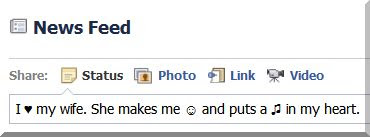
Now there is Trick to Add Symbols in Facebook Status Updates. It is very Easier and Handy Trick to Apply.
So to use this Trick Just Follow the below simple steps :
1) Login to Your
Facebook Account.
2) Now in the
Status Update Box press the following
Keys Combination to get
Specified Results :
>> Hold "
Alt " and Type "
1 ".
Result "
Happy Face ".
>> Hold "
Alt " and Type "
2 ".
Result "
Sad Face ".
>> Hold "
Alt " and Type "
3 ".
Result "
Heart ".
>> Hold "
Alt " and Type "
13 ".
Result "
Single Musical Note ".
>> Hold "
Alt " and Type "
14 ".
Result "
Double Musical Note ".
>> Hold "
Alt " and Type "
15 ".
Result "
Sun ".
>> Hold "
Alt " and Type "
0169 ".
Result "
Copyright Symbol ".
>> Hold "
Alt " and Type "
0188 ".
Result "
1/4 Symbol ".
>> Hold "
Alt " and Type "
0189 ".
Result "
1/2 Symbol ".
Note : Use the Numeric Keypad for Typing Numbers.
So it it is a simple Trick to Add Symbols in Facebook Status Updates.
by mayur khokhar
When
you discover an interesting website and want to copy a complete website
to view it locally without internet connection. If in hurry, you can
backup entire website on USB drive and view it afterward. Can be useful
even if you want to save thousands of images from a webpage in one
click.
HTTrack is a tool to save all the webpages from a specified
website. The website downloaded when viewed offline looks exactly as it
appears online. An exact mirror of the website is downloaded on your
HardDisk with all the styles, background images and alignments keeping
intact. The links pointing out of the page are also taken into
consideration means those pages are also downloaded. For example: You
have to download all the MP3 songs, Flash, videos or only some of them
using Filters from a website all at once then WinHTTrack is a feasible
option.
The sites downloaded can be used in your regular browser and there are
no waiting times to load another page as all the pages are already
stored offline in your Local Disk. Moreover, no active Internet
connection required to access it. Personally, I used it to show
research pages of my Project to the concerned professor where internet
connectivity was poor.
How to download complete website?
Enter Project name and Category (It can be anything according to the
site you are downloading). Next the Base Path where the site will be
downloaded.

More
than one URL can be entered to be downloaded. Specify them in the box.
You can specify filters to download specific extension of files like
MP3, JPG or PNG from Set Options buttons.
Then
Press Finish to start copying. You can prefer to shutdown PC after
downloading is completed as it may take few minutes depending upon the
size of files hosted on site.
Now,
to view the downloaded website go to the output folder and click on
index.html file (general name) or open the HTTrack Website copier
program and click Browse Sites from File menu.
by mayur khokhar
1- Power on fone ,, type : *#7465625#
you will identify wich code is active , wich is inactive
2- Remove battery ,, Put your sim card , not all of it ,, just to
prepare it to be full inserted , put your battery back and power on fone
,, you must see " insert sim" not "invalid sim.."
3- type : *2767*3855#
your fone should restart after 1 min ,,
now ,, and before it restart , push your sim card ,,without removing battery
4- your fone should work and accept the sim card ,, but if you chek locks you will find that your fone is still Loked
5- now type : *7465685*638*00000000*00000000#
your UNLOCK CODE is 00000000 now , hh Enjoy
6- now , back to Locks table with : *#7465625# ,, and for each active code you can disable it ,,,here details :
* Disables CP lock : #7465625*27*00000000#
* Disables Network lock : #7465625*638*00000000#
* Disables SIM lock : #7465625*746*00000000#
* Disables SP lock : #7465625*77*00000000#
* Disables Subset lock : #7465625*782*00000000#
by mayur khokhar
Hack Deep Freeze
What Is Deep Freeze
- It is an Software Which Uses unique Method of disk protection.
- By using This Software User permissions are not granted to install any software on computer/Client
- Generally it is Used at Cyber Cafe,Colleges etc
- How Can I Crack It ???
- You can Crack it Just use following steps to crack Deep Freeze.
Step 1:

Step 2:
- Extract it And Install it
Remember: This Software Is detected as Hacktool.deepfreeze by your antivirus
so You need to install it in Safemode or disable Antivirus Protection
Step 3:
Click to Enlarge

- Now Open that software
- and click on Boot Thawed button
- and Now click on load status.
- once the Status Loaded
- Click on Save Status
- Now Reboot Your System and Deep Freeze is now Hacked!!!
Now We have to Lock the Deep Freeze or Freeze
Then we have to freeze n Lock that State
Follow this
Step 4:
- Open that Software again
- Select the boot frozen button
- and click on load status.
Step 5:
- Once the Status is Loading
- Then click on save status button.
Step 6:
- Now Restart Your Computer Again
- Deep Freeze has been locked successfully.
- Njoy
by mayur khokhar
Now we can hide all of our Private Data in the Notepad as there is an
interesting Trick to Hide the Data in Notepad. Here is a simple Trick to
Hide text inside Windows Notepad using Command Prompt.
Note : This Trick only works on NTFS File System.
To use this simple Trick follow these simple steps :
1) Now click Start >> Run >> cmd to Open Command Prompt.
2) Type cd desktop to move File to the desktop.
3) Type "notepad filename.txt:hidden" ( without quotes ) in Command Prompt.
4) Write Some Private or any Data to be Hidden and Save the file.
5) Browse to the File Location and Open filename.txt. Now we cannot see any data in the File.
6) To retrieve the Hidden Data, Open Command Prompt again and type the
Same command "Notepad filename.txt:hidden" ( without quotes ).
7) Now the Hidden data has been retrieved.
So it is a simple Trick to Hide the Data in Notepad.
by mayur khokhar
We have discussed many facebook tricks. Now i am gooing to tell u a
trick to Upade Facebook Status In Blue
Color
- Login to Facebook
-
- Click update status
-
- Paste below code to ur status
-
- @[1: ]@@[1:[0:1: Your Text Here ]]
-
- Replace ” Your Text Here” with ur status
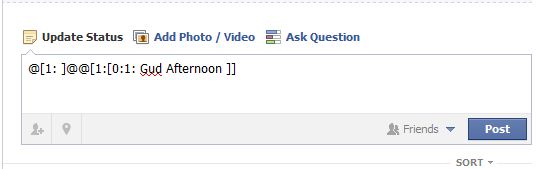 Status will be updated in Blue color


 Decided to burn lots of calories today so I set a fat kid on fire!



 Posts
Posts


 |
|


